
Originally published October 31, 2026.
What Happens When Power BI Copilot Has Multiple Semantic Models?
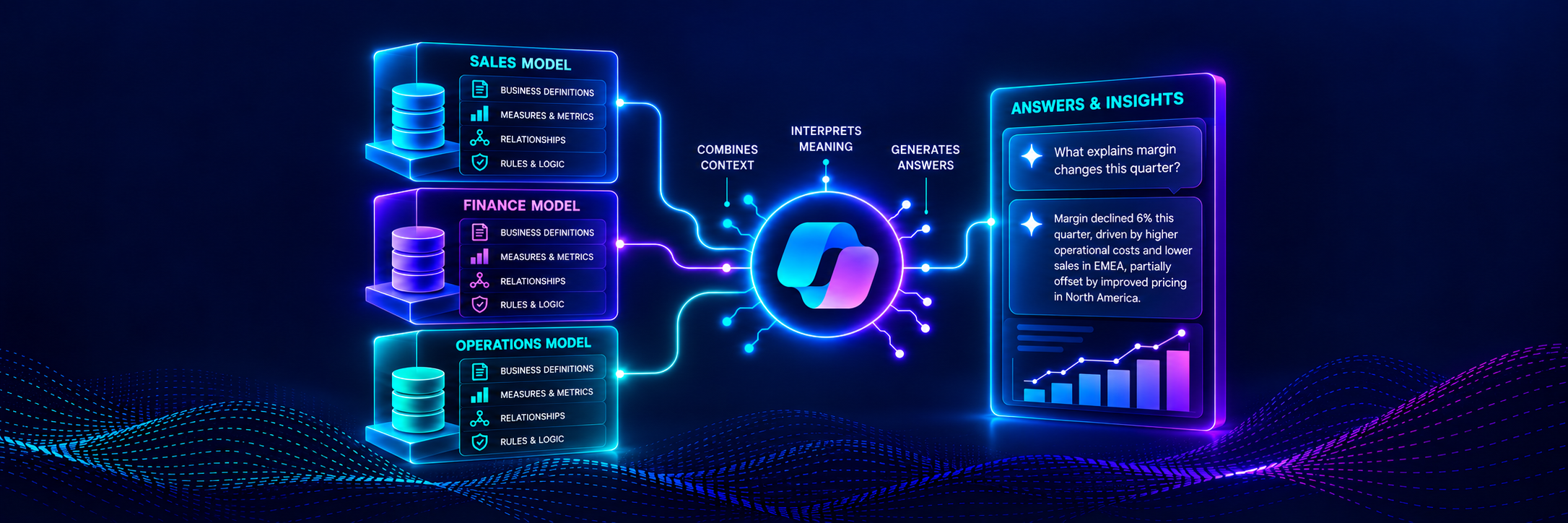
Key takeaway: App-scoped Copilot does not combine multiple Power BI semantic models into one unified semantic layer. It identifies relevant reports and, when needed, uses their underlying semantic models to answer questions. As you include more models in an app, consistent terminology, metrics, descriptions, and AI guidance become a semantic-governance requirement.
Copilot and Multiple Semantic Models
Preparing one Power BI semantic model for use with Copilot is challenging enough. But what happens when Copilot has access to several?
For Power BI teams implementing Generative BI, this is becoming an important question.
Because Power BI apps often contain multiple reports, they often include different semantic models covering different parts of the business. For example:
E-commerce Sales
Distributor Sales
Promotions
Inventory
Each Power BI semantic model may be well designed in isolation. However, when combining several models, there’s typically overlap of business concepts like:
Sales
Product
Customer
Geography
Now imagine a business user opens a Power BI app and asks the following question of Copilot:
“Which products had the worst margins last quarter?”
Which model should Copilot use to answer the question accurately?
That’s where App-scoped Copilot gets interesting.
What Is App-Scoped Copilot?
Power BI currently has several Copilot experiences:
Report-scoped Copilot works with the report a user already has open.
Standalone Copilot can search and answer questions across Power BI content the user can access.
App-scoped Copilot, currently in preview, sits somewhere in between.
App-scoped Copilot works with the curated content you included inside a Power BI workspace app. Content curation is what matters.
Instead of searching through all the Power BI goodness a business user can access, App-scoped Copilot operates within the reports and semantic models available to that user in a specific app.
For organizations already using Power BI apps as a governed distribution layer, this is a great option for deploying real-world Generative BI.
The Power BI app becomes a curated (i.e., governed) AI experience.
App-scoped Copilot is currently available for workspace apps, not org apps, and users access the experience from within the Power BI app itself.
How Does App-Scoped Copilot Find the Right Content?
Microsoft’s documentation lays out a fairly clear workflow. App-scoped Copilot can:
Summarize the reporting available in the app
Help users find relevant reports
Summarize an individual report
Answer user questions based on the curated content
When a user asks a question, Copilot first tries to identify the report that best matches the topic.
If Copilot finds a strong match, it selects that report in the background and answers the question immediately.
However, if the request is ambiguous, Copilot can ask clarifying questions.
And if the answer cannot be found in the selected report, Copilot can fall back to the report’s underlying semantic model.
It’s this progression of what Copilot does behind the scenes that is critical for providing a Generative BI experience that users trust:
App → Report → Semantic model
The user does not necessarily need to know which report contains the answer.
Copilot tries to make that decision for them.
Why Is This Better Than Chatting With One Report?
Imagine you’ve built a Power BI app for the sales team with separate reports for:
Sales Performance
Customer Retention
Promotion Profitability
Without App-scoped Copilot, a sales team member has to know which report to open to answer their question.
With App-scoped Copilot, the user can start with the business question. For example:
“How are our best-selling products performing?”
This sort of experience is at the heart of Generative BI as a self-service experience.
The business user needs to know nothing about the technical infrastructure, like which reports contain which metrics.
They just express what they need in natural language, and App-scoped Copilot uses curated content to deliver it.
Enabling this user experience is the next frontier for Power BI teams.
But Multiple Semantic Models Create a New Problem
Now suppose the Power BI app contains two reports: One for Internet Sales and one for Distributor Sales. Each report is backed by a Power BI semantic model.
Not surprisingly, both of these semantic models contain the following business concepts:
Sales
Product
Geography
Gross Profit
Gross Margin %
Now imagine a sales executive asks Copilot:
“Which products had the worst margins last year?”
From Copilot’s perspective, there are two valid answers:
One for Internet Sales.
One for Distributor Sales.
Per Microsoft’s documentation, App-scoped Copilot identifies the relevant items and can ask clarifying questions when it needs more context to answer accurately.
That’s exactly what you want Copilot to do.
But it raises a deeper design question:
“How obvious have we made the distinction between these semantic models?”
If both models use nearly identical terminology, report descriptions, measures, and business concepts, Copilot has less evidence for deciding which model to use to answer the user’s question.
This is where preparing your Power BI assets for Generative BI goes beyond individual semantic models.
Prep Data for AI Still Matters
You can configure each Power BI semantic model separately using the Prep data for AI feature. That includes:
Descriptions
AI data schemas
Verified Answers
AI instructions
Imagine you’ve configured the Internet Sales semantic model to explicitly tell Copilot:
“When users say customer, they mean an individual consumer.”
Meanwhile, you’ve configured the Distributor Sales semantic model to define a customer differently (i.e., use Distributor instead).
That additional context can help Copilot once it’s working with the curated semantic model content.
Verified Answers are especially relevant because Microsoft explicitly supports them in App-scoped Copilot.
However, this exposes a greater challenge.
Preparing each model independently doesn’t automatically create consistency across the semantic models.
What Happens When Models Use the Same Language Differently?
Imagine two Power BI semantic models, both containing a Sales measure. However, the measure isn’t the same across the models:
In one model, the measure is gross sales before discounts.
In the other model, the measure is net sales after discounts.
Now imagine both semantic models include the business concept of Customer.
As you might have guessed, these models don’t treat Customer the same way:
One model’s Customers are individual consumers.
The other model’s Customers are commercial accounts.
Now, here’s the thing you need to know as a Power BI professional learning Generative BI.
Each model may be perfectly prepared for AI in isolation and work very well in certain scenarios (e.g., report-scoped Copilot).
However, the problem appears when you include these two semantic models in the same app.
When combined in the app, the same natural-language phrase from a business user can point toward different meanings depending on which semantic model Copilot selects.
This isn’t necessarily a Copilot defect. It’s a semantic-governance problem. Power BI teams need to start asking:
“Are report names and descriptions specific enough to help Copilot choose?”
“Are overlapping business terms defined consistently across models?”
“If they mean different things, is the distinction obvious?”
“Are authoritative measures named consistently?”
“Do AI instructions reinforce the differences?”
“Should certain models even coexist inside the same app?”
These are Generative BI semantic architecture questions.
What Does Microsoft Not Clearly Document Yet?
In my opinion, Microsoft’s current documentation leaves some important questions unanswered.
For example, Microsoft’s documentation clearly explains that, in response to a user’s question, App-scoped Copilot:
Attempts to identify the right report.
Asks clarifying questions when needed.
Uses the report’s semantic model if the report itself can’t answer the question.
However, I don’t see Microsoft documenting how Copilot negotiates multiple semantic models within an app when more than one model could answer a user’s question.
Here are some examples of problematic scenarios I see working with my clients:
Two candidate reports ranked when both appear relevant.
Report descriptions versus semantic model metadata.
Different semantic models contain conflicting AI instructions.
Multiple Verified Answers could plausibly match the same question.
Synthesizing an answer across unrelated semantic models.
At the time of this writing, Microsoft’s current documentation describes an item-selection workflow much more clearly than a cross-model reasoning workflow.
Understanding this current state is critical for Power BI teams looking to deploy Generative BI.
Until Microsoft documents more (or testing proves otherwise), assume that placing several semantic models inside one app does not create a unified semantic layer across them.
Users Can Remove Some Ambiguity Themselves
If your users are willing to do a little extra work, there’s a way to help Copilot avoid problems with multiple semantic models within a single app:
App-scoped Copilot lets users attach a specific report to the conversation.
This tells Copilot exactly which report to use as the reference. A user can also explicitly name the report in a prompt. For example:
“What is revenue month to date using the Reseller Sales report?”
This can considerably reduce the ambiguity Copilot faces in multi-model situations.
However, in my experience, this isn’t the Generative BI experience that executives envision.
Also, in my experience, it isn’t practical to expect business users to know which report to use for each question.
The App Itself Becomes Part of AI Design
This leads to what I think is the bigger lesson for Power BI teams wanting to deploy Generative BI. For years, Power BI app design has largely focused on questions like:
Which reports should we include?
Which audiences should see them?
How should the navigation be organized?
Now, in 2026, App-scoped Copilot adds another question:
How understandable is this app to AI?
Make no mistake. Answering this question requires a new perspective on designing Power BI apps.
First, report names and descriptions matter differently because Copilot uses them to understand what reporting is available.
But it goes beyond just that. Other considerations are all critical for Copilot to produce accurate responses to user questions:
Clear semantic model boundaries.
Consistent terminology across models.
Model-level AI preparation.
Power BI apps are no longer simply a container for reports.
Power BI apps are now a governed way to deploy Generative BI with well-defined contexts for Copilot.
One AI-Ready Model Is Not Enough
This is why I think preparing Power BI for Generative BI is inevitably a semantic architecture problem. Yes, you can take one semantic model and:
Add rich descriptions.
Simplify the AI data schema.
Configure Verified Answers.
Create thorough AI instructions.
Test the model thoroughly with Copilot.
All of this is necessary and undeniably valuable for Generative BI.
But if the enriched semantic model is one of five models with inconsistent terminology and overlapping definitions within the Power BI app, Copilot will still encounter ambiguities.
For Power BI teams wanting to leverage App-scoped Copilot for Generative BI, the work becomes a two-step process:
Crafting AI-ready semantic models.
Assembling AI-ready Power BI apps.
That means thinking about the collection of reports and semantic models - not each Power BI asset independently.
The Practical Takeaway
I’m optimistic about App-scoped Copilot as a practical solution architecture.
Curating Power BI assets and providing guardrails for Copilot is an effective strategy for many of my clients as they start their Generative BI journeys.
This architecture helps users discover reports, summarize content, and ask questions without knowing exactly where the answer lives.
But the more semantic models are put inside the Power BI app, the more important semantic consistency becomes.
The Prep data for AI feature can make each model easier for Copilot to understand.
The next challenge is making sure the models make sense together.
That’s where Power BI architecture, semantic modeling, and AI governance start to converge.
Greetings! I’m Dave Langer
Author | Microsoft MVP | LinkedIn Top Voice

I help Power BI teams move past dashboards to Generative BI using Microsoft Fabric and Fabric IQ.
If your organization is serious about enterprise-class conversational analytics, we should talk.